1. Request your Webservice Configuration
-
Contact your local tourist authority (Kurverwaltung).
-
Ask them for the Webservice configuration PDF, which contains the Objekt-ID, Firma-ID and Kurverwaltung-ID
⚠️ Important: do not send the XML-Import configuration – it must be the Webservice version.
2. Add your Credentials in Stellar Trust
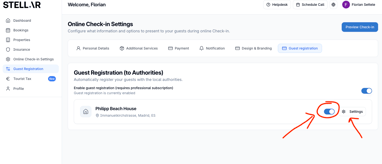
- Go to Guest Registration in your account.
- Activate Guest Registration and Automatic Sending to an Authority for each property in an AVS region.
- In the dropdown Automatically send info to, select AVS.
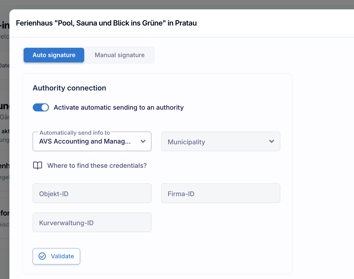
If your municipality is already listed:
- Copy the values for Objekt-ID, Firma-ID and Kurverwaltung-ID from your PDF into the fields.
- Click Validate, which should show a green validation message
If your municipality is not listed:
- Send the Webservice Configuration PDF to hello@stellar-trust.com.
- We will set the municipality up for you within 2–3 working days.
3. Clean up Guest Categories
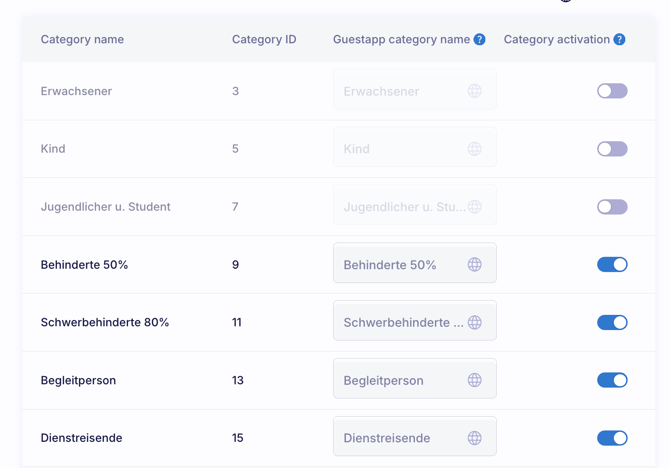
- After adding your credentials, you’ll see a list of possible guest categories (adults, children, etc.).
- Please deselect all categories that:
- do not appear in your Webservice configuration PDF, or
- are not relevant for your property.
This ensures that tourist tax is calculated correctly.
4. Activate automatic sending of guest cards
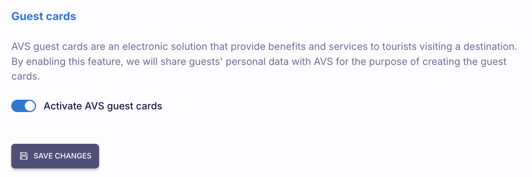
- Enable the toggle Activate AVS Guest Cards.
- This will ensure that the Kurkarte (guest card) is automatically generated and sent to your guests.
5. Click “Save changes”
Make sure to click Save changes once you have finished.
👉 If the button is not visible, please try adjusting your browser’s zoom settings.