
1. Understand the Updated Reporting Process
The Spanish Ministry now mandates guest data be sent to the SES Hospedajes system. This applies to all regions except the Basque Country and Catalonia. In those regions, you must continue using their local police systems (e.g., Mossos or Registro Hotelero Ertzaintza). The new process requires more detailed data, including payment method, bank card or account numbers, and info for all guests—even minors (including those younger than 14)
2. Create or Access Your SES Hospedajes Account (if you have not yet done so)
-
Register using a digital certificate tied to your fiscal ID (NIF: 8 digits + 1 letter). The NIF becomes your username.
-
Optionally set a separate password for simpler logins. This is still tied to the account and not used for web service access
3. Activate the Web Service
-
On the SES portal, go to “Acceso al registro de establecimiento y entidades” and click the “@” in the “Acceso” column.
-
Select “Mis datos registrados”, find the checkbox labeled “send communications via web service”, check it, and save
-
After saving, you’ll receive an email from [email protected]. It contains the credentials SES generates for the web service connection—distinct from your login credentials
From that email, note these values:
-
Lessor Code (
Código de arrendador) -
Establishment Code (
Código de establecimiento) -
Web Service Username (original NIF + “WS” suffix)
-
Web Service Password (SES‑generated)
4. Connect to SES via Stellar
In your Stellar (Chekin) dashboard:
-
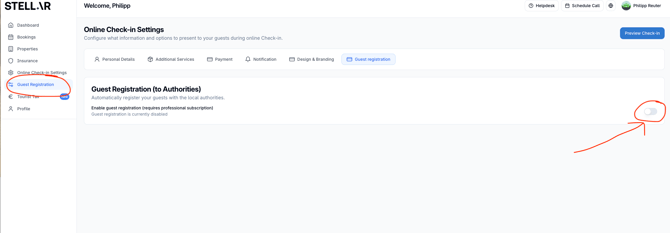
Go to "Guest Registration"
-
Enable Guest Registration (to Authorities)
-
Enable each accommodation and then choose settings
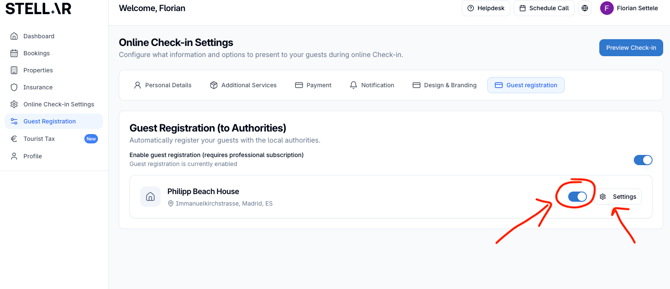
- Input the information about the accommodation
- Activate "Automatic sending to authority" and select SES Hospedajes
-
Input the web service credentials that you have:
-
User = Web Service Username
-
Password = Web Service Password
-
Establishment Code = Código de establecimiento
-
Lessor Code = Código de arrendador
-
-
Press Validate. If successful, you’ll see a confirmation.
-
Enable "Booking registration sending"
-
Choose a default Payment Type for reservations. Click Save
5. Troubleshooting Errors
If validation fails:
-
Return to SES portal → “Acceso al registro de establecimiento y entidades” → click “@” → uncheck “send communications via web service” → save.
-
Re‑check the box → save again. This triggers a new credentials email.
-
Use the new credentials in Stellar and repeat validation
-
If errors persist, contact support by opening a ticket