
1. Regulation Overview
In Catalonia, Spanish national SES Hospedajes is not used. All accommodation providers must send guest registration data directly to the Mossos d’Esquadra police system. Compliance is mandatory for every establishment located in this region
2. Access Your Mossos Account
-
Go to the Mossos d’Esquadra police portal.
-
Log in with the credentials provided to your establishment by the Mossos authorities.
-
Ensure you have both:
-
Username and password for the portal.
-
Establishment ID code assigned to your property
-
If you do not yet have access, request it directly from Mossos police.
3. Configure Mossos Connection in Stellar
-
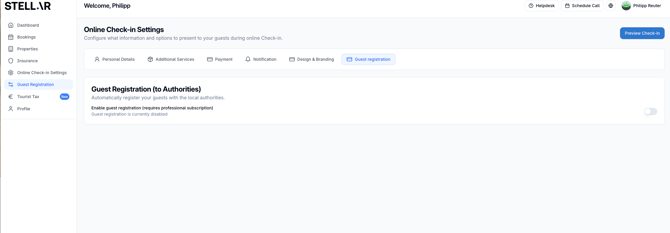
Log in to your Stellar dashboard.
-
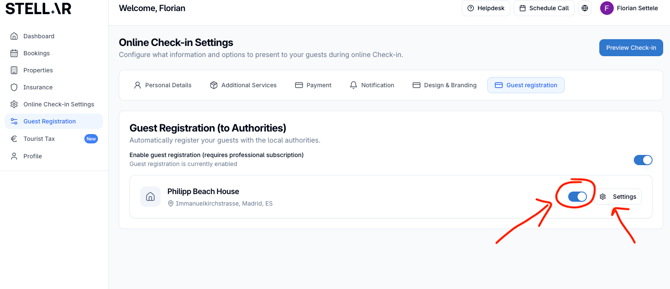
Activate Guest Registration for the accommodations relevant
-
From the dropdown, select Mossos d’Esquadra.
-
Enter:
-
Username (Mossos portal login)
-
Password (Mossos portal login)
-
Establishment ID (property identifier given by Mossos)
-
-
Click Validate to confirm the connection.
-
Once validated, Stellar will automatically send guest data to Mossos after every check-in
NOTE: The guest data is automatically sent to the authorities on the day of check-in around 19.00h UTC. If the guests register past this time, you will need to manually send the data by opening the reservation in Stellar and click SEND MANUALLY
4. Troubleshooting Connection Errors
-
Invalid credentials: Verify username, password, and establishment ID with Mossos.
-
Validation fails: Reset your password in the Mossos portal, then update it in Stellar.
-
Persistent issues: Contact Mossos support directly. If Stellar validation still fails after correcting credentials, reach out to Stellar support for assistance.